> For the complete documentation index, see [llms.txt](https://docs.nrnagents.ai/llms.txt). Markdown versions of documentation pages are available by appending `.md` to page URLs; this page is available as [Markdown](https://docs.nrnagents.ai/getting-started/action-space.md).

# Action Space

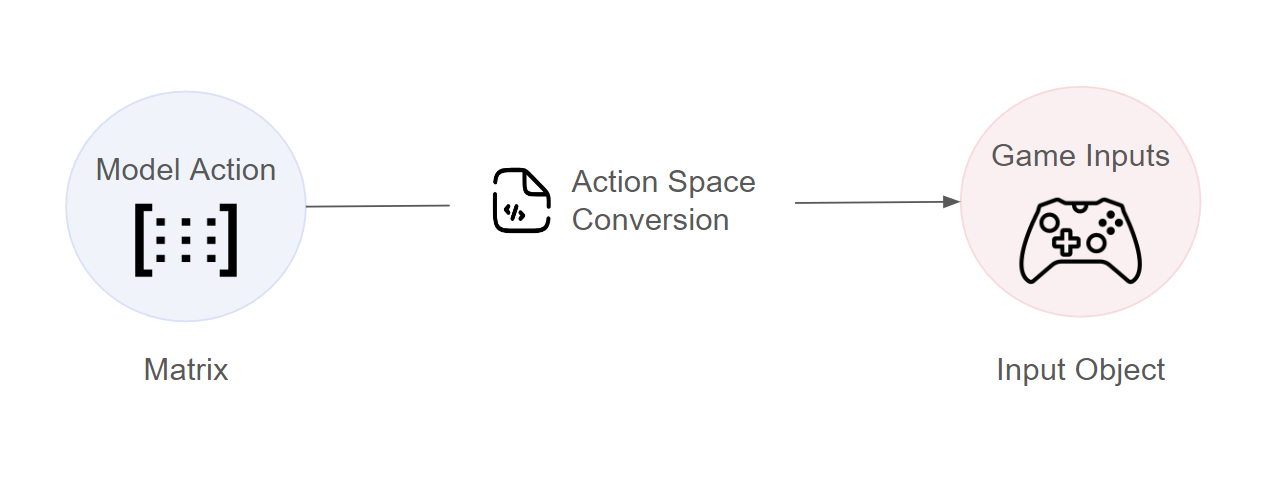
In order for model's actions to convert to something executable in the game world, we need to map it to controller/keyboard inputs - we will call this the model's "action space".

<figure><img src="/files/1d95fg0gJG7A7gZqwkZt" alt=""><figcaption></figcaption></figure>

In order to use the actions that an NRN agent recommends, we need to convert it into a format that the game can understand - this will be different for every game. Below we showcase an example of converting the output from an NRN model to a movement vector which can be used in a pong game:&#x20;

{% tabs %}
{% tab title="Javascript" %}

```javascript
const convertActionToGame = (actions) => {
    const movementInput = new Vector3()
    if (actions.up) {
        movementInput.y = 1
    }
    else if (actions.down) {
        movementInput.y = -1
    }
    return movementInput
}

const getActionOneHot = (inputs) => {
    const action = [0, 0, 0]
    if (this.pressed["KeyW"]) {
        action[0] = 1 // Up
    }
    else if (this.pressed["KeyS"]) {
        action[1] = 1 // Down
    }
    else {
        action[2] = 1 // idle
    }
}
```

{% endtab %}

{% tab title="C# - Unity" %}

```csharp
using UnityEngine;

namespace NrnIntegration
{
    class NrnActionSpace
    {
        public static Vector3 ConvertActions(Dictionary<string, bool> actions)
        {
            Vector3 movementInput = new Vector3();
            if (actions["up"]) movementInput = new Vector3(0,1f,0);
            else if (actions["down"]) movementInput = new Vector3(0,-1f,0);
            else if (actions["idle"]) movementInput = new Vector3(0,0,0);                
            return movementInput;
        }

        public static Dictionary<string, bool> ConvertInputToBools()
        {
            Dictionary<string, bool> actions = new Dictionary<string, bool>();

            actions["up"] = Input.GetKey(KeyCode.W);
            actions["down"] = !actions["up"] && Input.GetKey(KeyCode.S);
            actions["idle"] = !actions["up"] && !actions["down"];
        
            return actions;
        }
    }
}
```

{% endtab %}
{% endtabs %}

In the code shown above, we have 2 functions for action conversion:

* **Model -> Game:** This is used to execute the recommended action in-game
* **Game -> Model:** This is used to take human inputs and turn it into data that the model can use for training

---

# Agent Instructions
This documentation is published with GitBook. GitBook is the documentation platform designed so that both humans and AI agents can read, navigate, and reason over technical content effectively. Learn more at gitbook.com.

## Querying This Documentation
If you need additional information that is not directly available in this page, you can query the documentation dynamically by asking a question.

Perform an HTTP GET request on the current page URL with the `ask` query parameter, and the optional `goal` query parameter:

```
GET https://docs.nrnagents.ai/getting-started/action-space.md?ask=<question>&goal=<endgoal>
```

`ask` is the immediate question: it should be specific, self-contained, and written in natural language.
`goal` is optional and describes the broader end goal you are ultimately trying to accomplish on behalf of the user. GitBook uses it to tailor the answer towards what is most useful for that goal.

The response will contain a direct answer to the question and relevant excerpts and sources from the documentation.

Use this mechanism when the answer is not explicitly present in the current page, you need clarification or additional context, or you want to retrieve related documentation sections.
