Loading...
Loading...
Loading...
Loading...
Loading...
Loading...
Loading...
Loading...
Loading...
Loading...
Loading...
Loading...
NRN Agents is an AI gaming SDK that enables effortless creation, training, and deployment of intelligent agents for games. The SDK integrates seamlessly with various game genres, empowering studios to craft immersive, intelligent gameplay experiences for players worldwide.
Our technology specializes in modelling human player behavior through a process called imitation learning, which sets it apart from generative AI solutions like LLMs or image generation engines. We achieve this by collecting data on player actions in various in-game situations. We have two areas of specialization:
Imitation Learning: Agents that play games as humans do—solving tasks and subtasks in a natural, player-like manner.
Reinforcement Learning: Agents that are free from the limitations of human capabilities—they learn through a reward mechanism instead of strictly trying to copy humans.
NRN Agents currently offers two integration packages:
Full in-game integration ▸ We help studios create innovative and exciting AI-integrated experiences. NRN Agents' proprietary machine learning infrastructure reduces AI integration costs, making it scalable and profitable for studios to explore AI-enhanced gameplay.
In-game inference and access to NRN’s Trainer Platform ▸ We provide studios with a variety of tools that help solve common challenges, starting with improving player liquidity, enhancing user experience, and boosting player retention.
Below is a non-exhaustive list of game genres we operate in:
Shooter games (top-down, first-person, and third-person)
Fighting games (platform fighting and traditional FGC)
Social casino games
Racing games
We provide SDK extensions for games developed using TS/JS, Unity, or Unreal Engine.
Unreal Engine integration has been deprioritized and will be revisiting it in H2 2025
Every game studio that we work with will have 2 API keys:
Admin API key
In-game API key
The admin API key is responsible for managing the model architectures for the game studio, which is outlined . The in-game API key manages model creation, inference, data collection, and training.
The in-game keys are further separated into full-integration access and trainer platform access.
RPG (solving sub-tasks)
MMO (solving sub-tasks)
MOBA (solving sub-tasks)
In order to actually use the model in game, we need to perform inference. This means that we give the model a state matrix, and have it output an action.
For most use cases, it is appropriate to use the "select action" method. This will create a mapping which can then be used, via the action space conversion mention in this section, to execute the action in-game.
Alternatively, we allow game studios to access the "raw output", which is the probabilities of taking each of the actions in that state. The NRN Agents SDK comes with a Probabilistic Agent Wrapper that handles the distribution, but if game studios want more flexibility in building a custom wrapper, they are able to do this as well.
// Sample from the distribution to select an action
const action = agent.selectAction(state);

// Get the probability distribution over actions
const probabilities = agent.getProbabilities(state);// Sample from the distribution to select an action
Dictionary<string, bool> action = Agent.SelectAction(state);
// Sample from the distribution to select an action
Dictionary<string, Matrix> probabilities = Agent.GetProbabilities(state);In order to start using the SDK, you will need to set your apiKey and gameId as static attributes on the AgentFactory class (in Javascript) or ModelWrapper class (in C#). Each apiKey only works for a specific gameId.
const { AgentFactory } = require('nrn-agents');

AgentFactory.setApiKey("my-api-key");
AgentFactory.setGameId("my-game-id");using ArcAgents.MachineLearning;
ModelWrapper.SetApiKey("my-api-key");
ModelWrapper.SetGameId("your-game-id");Now that you have your apiKey and gameId set, every HTTP request you make to the NRN Agents server will automatically use it.
In order for the NRN Agents SDK to know how to communicate with a game, we need to add 2 files. These files will define the state space and action space, which we begin to discuss in the basic integration section.
It is advised that game studios make an nrn-integration folder inside their helpers folder. Inside this folder, we need to add the files to define the state and action space.
It is advised that game studios make an NrnIntegration folder inside theScript folder. Inside this folder, we need to add the files to define the state and action space.
It is advised that game studios make an NrnIntegration folder inside the folder where they have all their game code. Inside this folder, we need to add the files to define the state and action space.
npm install nrn-agents.
└── src/
└── helpers/
└── nrn-integration/
├── nrn-state-space.js
└── nrn-action-space.js.
└── Assets/
└── Scripts/
└── NrnIntegration/
├── NrnStateSpace.cs
└── NrnActionSpace.cs.
└── Source/
└── Game/
└── NrnIntegration/
├── NrnStateSpace.cpp
├── NrnStateSpace.h
├── NrnActionSpace.cpp
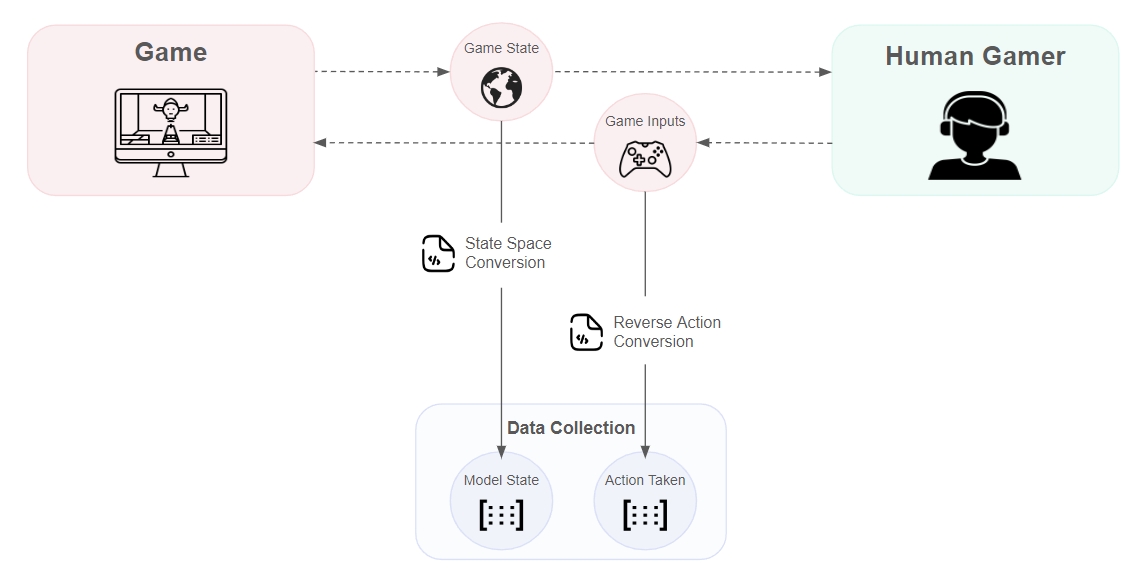
└── NrnActionSpace.hBelow we show a visual of the flow when a human gamer is playing the game and we are collecting data to be used in training at a later time.
Once we obtain the state and action pair, which can be seen in the basic integration, we simply call the collect method as follows:
agent.collect({ state, action });Agent.Model.Collect({ state, action });By default we collect data every 10 frames, but the optimal frequency will change depending on the game genre and frame rate of the game. In order to change the data collection interval, we can use the following line of code:
agent.setCollectionInterval(15); // Collect every 15 framesAgent.Model.SetCollectionInterval(15); // Collect every 15 framesIn the initial research phase of an NRN integration, it is very likely that we will test an architecture setup that does not work that well. As such, it is advised that game studios unregister their architecture to remove any unused architectures/clutter.
To unregister, admins only need to provide the architectureId as an input.
As mentioned in the register section, there is currently no GUI for registration, so admins will have to execute code as follows to unregister a model architecture:
To unregister, admins will need to add the "Registration" component as defined .
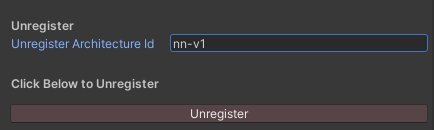
At the bottom of the component, admins will be able to enter the architectureId of the model architecture that they wish to remove.
Not yet implemented. The NRN team will handle unregistering for the time being.
Unregistering active model architectures may break existing pipelines. Always ensure no current models are running on an architecture that you plan on unregistering.
Admin access is responsible for registering and unregistering model architectures. Once we have a model architecture registered, then we are able to create models in-game and begin to use them!
The process for defining the model architecture will require some initial joint collaboration from the NRN team and the game studio. Ultimately we need to settle on:
Type of inductive bias
Size and structure of the state space
Size and structure of the action space
Overall size of the model
We dive deeper into each of these in the section.
In order to register model architectures for a game on the NRN Agents platform, we will need to define a few parameters:
modelType: "neural-network" for Feedforward Neural Network or "simple" for Tabular Agent.
architectureId: The unique identifier you want to use for your model architecture.
We have 2 other models in the final stages of testing and will be released to production very soon:
Hierarchical Neural Network
Convolutional Neural Network
When registering a model, we need to know the size of the state space. In the case of a feedforward neural network, this is the number of features in the input vector. While for the tabular agent, this is the number of discrete scenarios.
When starting the process, the NRN team will work collaboratively with the game studio to figure out which features are important for decision making and design a state space around that.
Learn more about state spaces here.
As part of the initial research, we have to figure out all the actions a player can take in the game and come up with an action space for the agent. The end result will largely depend on how many actions an agent can take simultaneously and whether the actions are discrete or continuous.
Learn more about action spaces here.
The size of the network determines the degrees of freedom that a model has to learn an objective. Generally speaking, the larger the neural network, the higher likelihood it can learn "more". Thus, as the complexity of the games increase, so will the size of the neural networks that we decide to deploy.
Part of the research process will be testing various model sizes to find the perfect fit for the game. We want the model to be large enough to behave intelligently in the game, yet small enough to perform inference very fast and not cause frame drop. A member of the NRN team will be advising each game on the appropriate model size.
inputDim: The number of features in the state space (i.e. the input dimensionality).
actions: The structure of the action space. Each action "head" is responsible for a portion of the action space. Thus, we have to define the list of actions that each head is able to execute.
Through the Javascript SDK developers can register as follows:
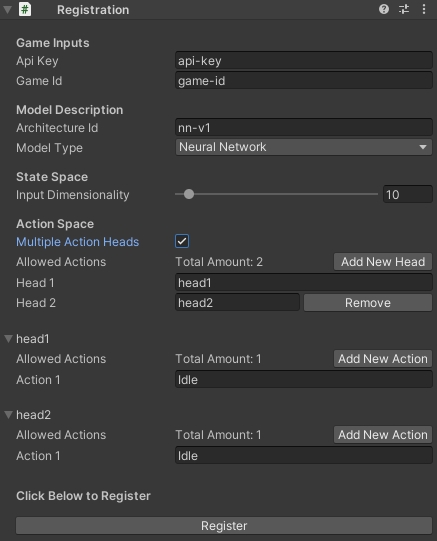
For Unity games, we created a component in the library that admins can add to the inspector. To use the registration component, follow these instructions:
Select any game object in the scene
In the Inspector, click Add Component and search for NrnAgents then proceed to select Registration
Fill out all the appropriate parameters and then click the "Register" button
Below is a snapshot of what the registration component looks like in the Unity inspector.
Not yet implemented. The NRN team will handle registration for the time being.
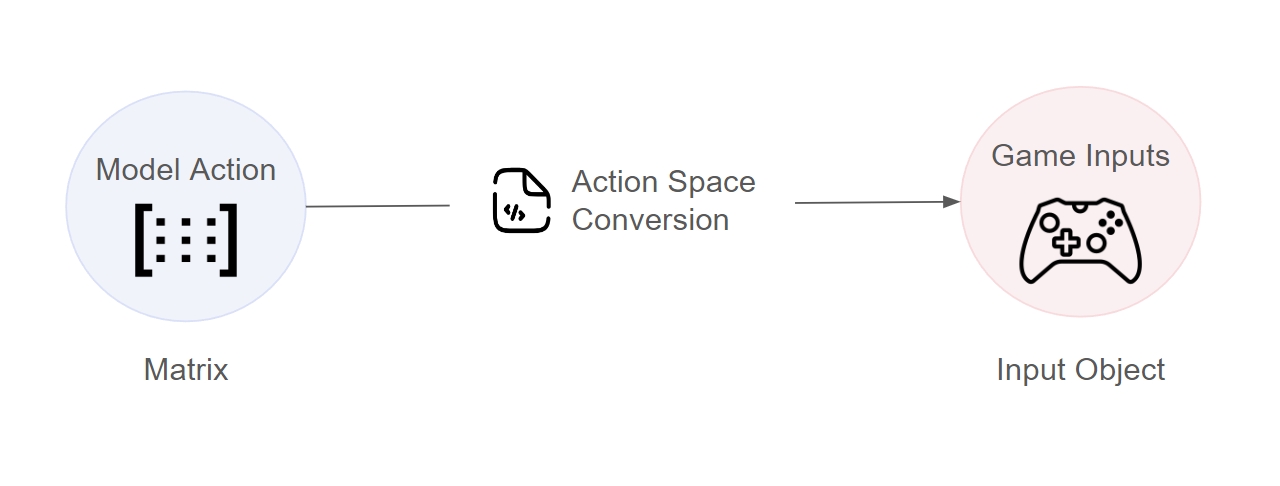
In order for model's actions to convert to something executable in the game world, we need to map it to controller/keyboard inputs - we will call this the model's "action space".
In order to use the actions that an NRN agent recommends, we need to convert it into a format that the game can understand - this will be different for every game. Below we showcase an example of converting the output from an NRN model to a movement vector which can be used in a pong game:
In the code shown above, we have 2 functions for action conversion:
Model -> Game: This is used to execute the recommended action in-game
const { Registry } = require('nrn-agents');

Registry.setApiKey("my-admin-api-key");
const registry = new Registry("my-game-id");

const registrationInputs = {
    modelType: "simple",
    architectureId: "my-first-model",
    inputDim: 7,
    actions = {
        direction: ["up", "down", "idle"]
    }
}

await Registry.register(registrationInputs)const { Registry } = require('nrn-agents');
Registry.setApiKey("my-admin-api-key");
const registry = new Registry("my-game-id");
await registry.unregister("my-first-model)Game -> Model: This is used to take human inputs and turn it into data that the model can use for training
const convertActionToGame = (actions) => {
    const movementInput = new Vector3()
    if (actions.up) {
        movementInput.y = 1
    }
    else if (actions.down) {
        movementInput.y = -1
    }
    return movementInput
}

const getActionOneHot = (inputs) => {
    const action = [0, 0, 0]
    if (this.pressed["KeyW"]) {
        action[0] = 1 // Up
    }
    else if (this.pressed["KeyS"]) {
        action[1] = 1 // Down
    }
    else {
        action[2] = 1 // idle
    }
}In order to test out the SDK, users can create a demo agent that can start taking actions in their game! The purpose of the demo agent is to test out the entire flow of feeding in a state, taking actions, collecting data, and executing the actions in-game.
const { AgentFactory } = require('nrn-agents');

const modelData = {
  config: {
    modelType: "neural-network",         // Type of model architecture
    inputDim: 5
using NrnAgents.Agents;
using NrnAgents.MachineLearning;

ModelData modelData = new ()
{
    Config = new ()
    {
        ModelType =
When initializing a model in-game, we need to use the following inputs:
architectureId: A model architecture that has been registered
userId: Unique identifier for a specific player
slotIdx: Which model to use since each player may have multiple model slots
If NRN detects that there is already a model loaded for that user, it will load the trained model. In order to create a new randomly initialized model, developers can either input an unused slotIdx when creating the agent or call the reset method (currently only available in Javascript).
As mentioned in the section, game studios will be required to create 2 files in order for the NRN Agent to "understand" the game world, and for the game world to "understand" the NRN Agent output. The NRN team will provide partner game studios with template files for Javascript, Unity, and Unreal.
After instantiating the NRN Agent, the basic flow for integration is as follows:
Convert the game world into an state space that the NRN model can use
Human Controlled
using UnityEngine;

namespace NrnIntegration
{
    class NrnActionSpace
    {
        public static Vector3 ConvertActions(Dictionary<string, bool> actions)
        {
            Vector3 movementInput = new Vector3();
            if (actions["up"]) movementInput = new Vector3(0,1f,0);
            else if (actions["down"]) movementInput = new Vector3(0,-1f,0);
            else if (actions["idle"]) movementInput = new Vector3(0,0,0);
            return movementInput;
        }

        public static Dictionary<string, bool> ConvertInputToBools()
        {
            Dictionary<string, bool> actions = new Dictionary<string, bool>();

            actions["up"] = Input.GetKey(KeyCode.W);
            actions["down"] = !actions["up"] && Input.GetKey(KeyCode.S);
            actions["idle"] = !actions["up"] && !actions["down"];

            return actions;
        }
    }
}
Update human inputs
Convert executed inputs to an action that the NRN model can understand
Add the state and action pair to the dataset
NRN Agent Controlled
Perform inference to select the action
Convert the selected action to an input that the game can understand
Either send data to the trainer platform or train directly in-game
Below we show how to initialize the model and use it at the game manager level:
Then at the end of the game, you can send the data you collected to the trainer platform as follows:
OR
If you have the API access to train in-game, then you can directly train within the game loop as follows:
Then at the end of the game, you can send the data you collected to the trainer platform as follows:
OR
If you have the API access to train in-game, then you can directly train within the game loop as follows:

class Game {
    // Instantiate agent
    constructor(agentInputs) {
        this.agent = AgentFactory.createAgent(...agentInputs);
    }

    // Game loop update
    update() {
        // Get the state space for the model
        const state = getStateSpace(this);

        if (this.human) {
            // If human is controlling, then update their inputs
            this.inputs.p1.update();

            // Convert the inputs into something the NRN agent can understand
            const action = getActionOneHot(this.inputs.p1);

            // Add the observed state and action to the dataset
            this.agent.collect({ state, action });
        }
        else {
            // If NRN agent is controlling, then perform inference
            const agentAction = this.agent.selectAction(state);

            // Execute the action in-game
            convertActionToGame(agentAction);
        }
    }
}await agent.uploadData();await agent.train(model.getTrainingData(), trainingConfiguration);public class Game : MonoBehaviour
{
// Define the agent that will be taking actions
public IAgentRL Agent { get; set; }
// Instantiate model
private async void _loadAgent(modelInputs)
{
Agent = AgentFactory.CreateAgent<IAgentRL>("reinforcement", modelInputs);
}
// Game loop update
private async void Update() {
// Create the world representation which we will convert to the state space matrix
var world = new NrnIntegration.NrnWorld
{
// All world attributes/objects that are relevant for the AI
};
// Get the state space for the model
Matrix state = NrnIntegration.NrnStateSpace.GetState(world);
if (human)
{
// Convert the inputs into something the NRN agent can understand
Dictionary<string, bool> action = NrnActionSpace.ConvertInputToBools();
// Add the observed state and action to the dataset
Agent.Collect({ state, action });
}
else {
// If NRN agent is controlling, then perform inference
Dictionary<string, bool> agentAction = Agent.SelectAction(state);
// Execute the action in-game
NrnActionSpace.ConvertActions(agentAction);
}
}
}await Agent.UploadData();await AgentArc.Train();const { AgentFactory } = require('nrn-agents');
const agent= AgentFactory.createAgent(
"my-first-model", // architecture id
"user-id", // user id
0, // slot idx (default 0 if not provided)
)
await agent.initialize()
agent.reset() // To reset the agentusing NrnAgents.Agents;
IAgentRL Agent = AgentFactory.CreateAgent<IAgentRL>(
"reinforcement", // learning algorithm type
"my-first-model", // architecture id
"user-id", // user id
0, // slot idx
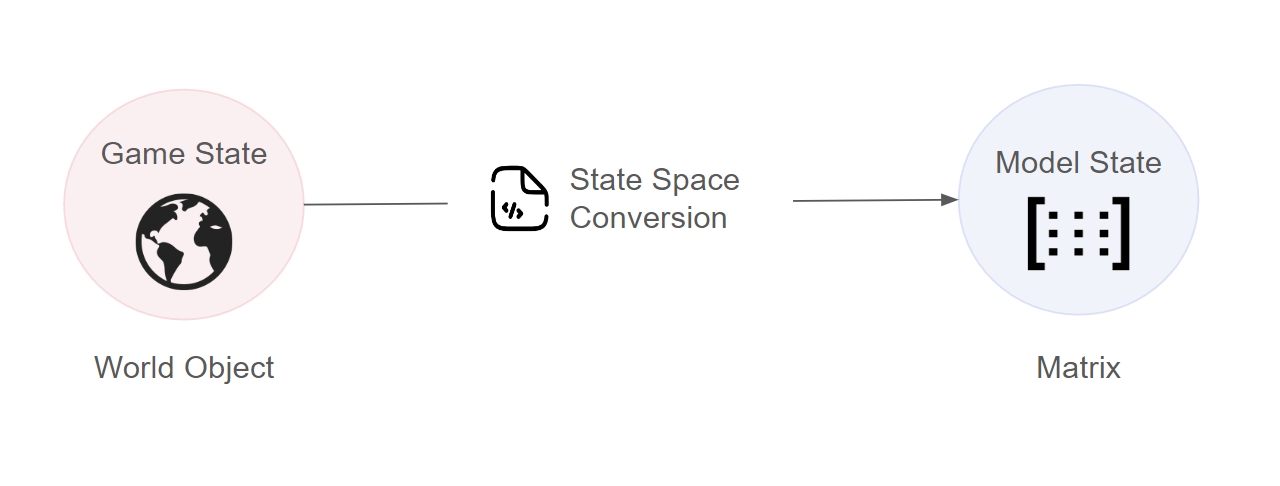
);In order for the agents to understand the game world, we need to convert the game state into a format that it can digest - we will call this the model's "state space".
Each model architecture will have different structure for the state space, so it is important to clearly define the features that are important to your game and the method to extract them. Developers can either use the built-in feature engineering module or create their own custom features.
The NRN agents SDK comes with an ability to automatically extract features from a game world. Developers only need to define a configuration so the SDK knows how to access certain values from the game world. Below we show an example getting the following features:
Raycasts that originate from the player and detect enemies around it
Relative position (distance and angle) to a powerup
Coming Soon
The state config is comprised of an array of feature configs of the following format:
In the configurations below, we use the notation string -> objectType to denote that the value for the key must be a string that points to an object of a particular type.
If developers want to create features that are currently not offered by the feature engineering module, then they are able to. Below we showcase how to convert a game world to a state matrix with custom feature engineering:
import { FeatureEngineering } from "nrn-agents"

FeatureEngineering.setStateConfig([
  {
    type: "raycast",
    keys: { origin: "player", colliders: "enemies", maxDistance: "gameArea.width" },
    setup: { numRays: 8 }
  },
  {
    type: "relativePosition",
    keys: { entity1: "player", entity2: "items[0].powerup", maxDistance: "gameArea.width" }
  }
])

const state = FeatureEngineering.getState(world){
type: string, // Name of the feature type
keys: Record<string, string>, // Keys used to extract values from the game world
setup?: Record<string, any> // Additional setup parameters
}{
type: "raycast",
keys: {
origin: string -> { x: number, y: number },
colliders: string -> { x: number, y: number, width: number, height: number }[],
maxDistance: string -> number
},
setup?: { numRays: number }
}[
Ray 1, // (1 / numRays) * 360 degrees
Ray 2, // (2 / numRays) * 360 degrees
Ray 3, // (3 / numRays) * 360 degrees
...
Ray N, // 360 degrees
]{
type: "relativePosition",
keys: {
entity1: { x: number, y: number },
entity2: { x: number, y: number },
maxDistance: number
}
}[
Distance // 0 is farthest, 1 is closest
Sin(Radians) // Direction indication #1
Cos(Radians) // Direction indication #2
]{
type: "relativePositionToCluster",
keys: {
origin: { x: number, y: number },
clusterEntities: { x: number, y: number }[],
maxDistance: number
}
}[
Distance // 0 is farthest, 1 is closest
Sin(Radians) // Direction indication #1
Cos(Radians) // Direction indication #2
]{
type: "onehot",
keys: { value: string },
setup: { options: string[] }
}[
0 or 1, // 1 if option[0] == value, otherwise 0
0 or 1, // 1 if option[1] == value, otherwise 0
...
0 or 1, // 1 if option[N-1] == value, otherwise 0
]{
type: "binary",
keys: { value: number | string },
setup: {
operator: "=" | ">" | "<" | "!=",
comparison: number | string
}
}[
0 or 1, // 1 if criteria is met, otherwise 0
]{
type: "rescale",
keys: {
value: number,
scaleFactor: number
}
}[
Rescaled value, // Number between 0 and maxPossibleNumber/scaleFactor
]{
type: "normalize",
keys: { value: number },
setup: {
mean: number,
stdev: number
}
}[
Normalized value, // Rescaled number by mean and standard deviation
]const bound = (x) => {
return Math.max(Math.min(x, 1), -1)
}
const getStateSpace = (world) => {
const paddlePos = {
x: world.paddleLeft.x,
y: world.paddleLeft.y + world.paddleLeft.height / 2
}
const paddleScaling = 1 - world.paddleLeft.height / world.gameArea.height
const absolutePaddlePos = (paddlePos.y / world.gameArea.height - 0.5) * 2 / paddleScaling
return [[
absolutePaddlePos,
(world.ball.y - paddlePos.y) / world.gameArea.height,
bound((-world.ball.x / world.gameArea.width + 0.5) * 2),
bound(world.ball.dx / 8),
bound(world.ball.dy / 8)
]]
}
const state = getStateSpace(world)using NrnAgents.MathUtils;
namespace NrnIntegration
{
class NrnStateSpace
{
private static float gameAreaHeight = 8;
private static float gameAreaWidth = 16;
private static float paddleHeight = 2;
private static float PaddleScaling { get; set; }
public NrnStateSpace()
{
PaddleScaling = 1 - (paddleHeight / gameAreaHeight);
}
public static double bound(double x) => Math.Min(1, Math.Max(-1, x));
public static Matrix GetState(NrnWorld world)
{
double leftPaddleY = world.leftPaddlePos.y;
double absolutePaddlePos = (leftPaddleY / gameAreaHeight) * 2;
double yDist = (world.ballPos.y - leftPaddleY) / gameAreaHeight;
double xDist = bound((-world.ballPos.x / gameAreaWidth ) * 2);
double xVel = bound(world.ballVel.x / 8);
double yVel = bound(world.ballVel.y / 8);
return CreateStateMatrix(new List<double> { absolutePaddlePos, yDist, xDist, xVel, yVel });
}
private static Matrix CreateStateMatrix(List<double> stateList)
{
Matrix state = new(1, stateList.Count);
List<List<double>> nestedListState = new List<List<double>> { stateList };
state.FillFromData(Matrix.To2DArray(nestedListState));
return state;
}
}
public class NrnWorld
{
public Vector3 ballPos { get; set; }
public Vector3 ballVel { get; set; }
public Vector3 leftPaddlePos { get; set; }
public Vector3 rightPaddlePos { get; set; }
}
}